I've lost more work to silence than to a better competitor. An enquiry sat in an inbox over a long weekend. A proposal went out without anyone agreeing what happened next. Then the client went quiet, and the only thing left to send was a reminder that read like chasing.
This schedule is the fix I use. It rests on one rule: agree the next step before you need it, and make every later message worth opening. It has ten steps across the three moments where work goes quiet (the enquiry, the first call and the proposal), plus a nurture step for work that doesn't close. The file has every step, the language rules and three worked examples.
The schedule at a glance
| Step | When | What it does |
|---|---|---|
| E1 | The same working day, or by 11:00 the next day | Shows a person read the enquiry and understood it |
| E2 | 3 working days after E1, if no reply | Gives them something useful, and offers the next step once more |
| E3 | 10 working days after E1, if still no reply | Closes politely and leaves the door open |
| C1 | Within 1 working day of the first call | Puts what you agreed in writing |
| P0 | On the day you agreed to send the proposal | Sends it, with the next step and its date |
| P1 | 2 to 3 working days after P0 | Goes through the proposal together |
| P2 | 7 days after P0 | Helps them decide, without asking for a decision |
| P3 | 14 days after P0 | Asks where the decision stands |
| P4 | 30 days after P0 | Closes the file without pressure |
| N | Every 90 days after close, up to four times | Stays useful to people who may buy later |
When the client replies at any point, the schedule stops and you carry on by hand.
Give this to Claude
Claude reads a list of your open enquiries and proposals, works out the date of every remaining step, and writes a calendar file you can import. It drafts each next message from the rules, and it asks before creating any file.
Paste it into Claude Code, opened in a folder that holds your list as a CSV file (export it from your pipeline sheet).
I run follow-up with the ten-step schedule below. Use it on my open work.

My working week is [Monday to Friday], my time zone is [your time zone], and these days are holidays for me: [none, or list them]. If a step's date has already passed, date it the next working day and mark it overdue.

The schedule:
- E1: same working day if the enquiry arrived before 15:00, otherwise by 11:00 the next working day
- E2: 3 working days after E1, if no reply
- E3: 10 working days after E1, if still no reply
- C1: within 1 working day of the first call
- P0: the agreed send date
- P1: the agreed walkthrough, ideally 2 to 3 working days after P0
- P2: 7 calendar days after P0
- P3: 14 calendar days after P0, or 2 working days after the client's decision date if they gave one
- P4: 30 calendar days after P0, or 5 working days after the decision date if later
- N: every 90 days after close, up to four times
If the client has replied, the schedule for that row stops.

1. Find the CSV file in this folder. Show me its column names and the first three rows, and tell me which columns you will read as the client, the stage, the last step sent and its date. Wait for me to confirm.
2. For each row that has not had a reply, work out the remaining steps and their dates. Show me the result as a table: client, step, date, what the step does.
3. Draft the next message for each row. Each one must name something specific to that client, give them something or ask one clear question, carry one next step with a date or two times, and stay under about 120 words. Never use: just checking in, just following up, circling back, touching base, bumping this, any update?, did you get a chance to, I haven't heard back, friendly reminder, gentle nudge, last chance, limited time. Never invent a deadline, a discount or a result.
4. Ask me before you write any file. When I say yes, write follow-up.ics (one event per step, titled like "P2 value-add: [client]") and follow-up-drafts.md (the drafts), and tell me how to import the .ics file into my calendar.
5. Finally, check your own work: confirm every row without a reply has exactly one next step dated today or later, and that no draft contains a phrase from the list. Report anything that fails.
Steps
Step 1: Open the file and set your timings
Download the Word file and open it in Word, Google Docs, Pages or LibreOffice. The timings in it are defaults. Change any gap to suit your firm, but keep two rules: never add a message between P0 and P4, and never make a gap longer than the file says.
Working days follow your own working week, in your own time zone.
Step 2: Agree the next step on the call
This is the step that does most of the work. Before the first call ends, agree two dates out loud: the day the proposal will arrive, and a time to go through it together. Write both in the call summary (C1) the same day.
When the proposal goes out on the agreed day (P0), the walkthrough (P1) is already in both calendars. Nothing after that has to sound like a reminder, because the client expected it.
Step 3: Put every step in your calendar
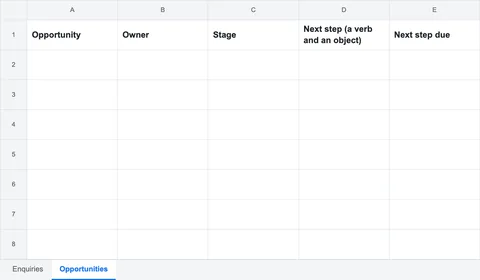
For each open enquiry and proposal, add the steps that are still to come as calendar entries on their dates. Name each entry the same way, so a glance at the week tells you what is due.
A calendar entry title, one per steptext P2 value-add: Fernhill Logistics proposal (sent 14 Oct)If you keep a pipeline sheet, put the next step and its date in the opportunity's row instead. Either way, each step should show up on the day it is due without you having to remember it.
Step 4: Write each message from the rules
Before you send a message, check it against the four rules in the file. Each message must:
- name a specific thing from their situation;
- give them something or ask one clear question;
- carry one next step, with a date or two times;
- be short enough to read on a phone, about 120 words, except the call summary.
Then check it for the phrases the file rules out. This is the list to keep beside your drafts:
Phrases no message uses (from the file)text just checking in just following up following up on my last email circling back touching base bumping this any update? did you get a chance to I haven't heard back as per my previous email per my last note hope you're well, just wanted to friendly reminder gentle nudge last chance limited time before prices go upNo message invents a deadline or a discount, claims a result you can't back up, mentions other clients without their permission, or apologises for following up.
Step 5: Stop the schedule when they reply
The moment the client replies, delete the remaining entries for that enquiry or proposal and carry on the conversation by hand. If they give you a decision date, move P3 to two working days after it and P4 to five working days after it.
Step 6: Check it worked
At the end of your first week, open your calendar or pipeline and check two things. Every open enquiry and every sent proposal has its next step on a date. And no message you sent that week used a phrase from the list. If both are true, the schedule is running.
If something goes wrong
The client replied, but the next step still showed up
The schedule stops at the first reply, but a calendar entry doesn't know that. When a client replies, delete that client's remaining entries straight away. If you use the pipeline sheet, set the row's status to "In conversation" so its next step stops counting as due.
They gave a decision date weeks away
Move P3 to two working days after their date and P4 to five working days after it. Don't fill the gap with extra messages; P2 is still the one message that helps them decide.
Several people at the client will decide
Ask on the call who else will read the proposal, and invite them to the walkthrough (P1). If you couldn't, P2 is a good place to offer a second walkthrough for anyone who missed the first.
The client is in another time zone
Count working days in your own week and send at a time that lands in their morning. If the gap between you is large, offer two walkthrough times that suit them, not you.
My calendar won't import the .ics file
Google Calendar, Apple Calendar and Outlook import it as written. A stricter calendar app may want Windows line endings, which is what the calendar format officially specifies. Ask Claude Code to convert follow-up.ics to CRLF line endings, then import it again. Import it once only: importing twice makes every event twice.
My message is over 120 words
Cut everything that isn't the one specific thing, the one thing you're giving them, and the next step. The call summary (C1) is the only message that may run longer.
Common mistakes
- Sending the proposal without an agreed next step. Then every later message has to invent a reason to exist. Agree the walkthrough on the call.
- Adding "just one more" message between P0 and P4. More messages after a proposal don't help it get read. Make P2 better instead.
- Letting P4 slide. Closing the file at 30 days, politely, is what makes the earlier messages feel calm. It also keeps your pipeline honest.
- Copying the worked examples word for word. They are for a made-up firm and client. Each message has to name something from the real client's situation.
Where the timings come from
The timings are ceilings and floors drawn from the evidence, not a formula. No study has measured them for expert firms, and most of the figures come from vendors' own data, which shows a link, not a cause.
| Choice | Evidence | Its limits |
|---|---|---|
| Reply within one working day | An audit of 2,241 US companies (Harvard Business Review, 2011) found 23% never answered a web lead | Dated; US companies in general, not expert firms |
| Send the proposal within days of the call | Proposals sent within 24 hours of the conversation were 19.1% more likely to win (Better Proposals, 2020) | Vendor data, dated; sample size not stated; a link, not a cause |
| No more than four messages after a proposal | Top sellers reached a meeting in about 5 touches against an average of 8 (RAIN Group) | Outbound prospecting, not following up a sent proposal; used only as a ceiling |
| Messages that add something, not reminders | Blair Enns, Jonathan Stark and Mo Bunnell all argue against chasing | Practitioners' positions, not data |
Using it
You may use, change and share the file inside your own firm. Please don't sell it or publish it as your own.